App 的启动流程
当用户点击应用图标时,由 Launcher 通过
Binder IPC 调用系统服务,请求启动目标应用的
Activity,本质上是调用 startActivity()
请求会进入系统服务 AcitivityManagerService(AMS), AMS
首先会判断进程是否存在,如果存在就直接复用,否则就创建一个新进程
新进程的创建不是直接 fork 出来的,而是通过 Zygote
来创建的,Zygote 已经预加载了 ART
和一些系统类和资源,fork 出来的进程能更快地启动
AMS 通过 socket 向 Zygote
发送创建某个应用进程的请求
Zygote 执行 fork(),创建出一个新的进程
新进程会执行
ActivityThread.main(),这是真正的入口函数
在 AcitivityThread.main() 中会完成主线程(即 UI
线程)的创建,包括初始化 Looper 和创建
MessageQueue;同时会创建一个 ApplicationThread
实例,并通过 Binder 将其注册到 AMS 中;接着通过
LoadedApk.makeApplication() 加载 Application
实例,并调用 attach() 和 onCreate() 来完成
Application 的初始化
接下来 AMS 通过 Binder 通知应用进程启动目标
Activity,ActivityThread 接收到消息后调用
scheduleLaunchActivity() 来处理请求,然后通过
performLaunchActivity() 方法来实际启动目标 Activity ,并调用
Activity.attach() 绑定到当前线程,绑定完后,系统会依次调用
onCreate(),onStart(),onResume(),使得目标
Activity 完成初始化并进入到可以交互的状态
Binder
是安卓系统中用于进程间通信的核心机制,允许不同进程间中的应用程序进行数据交换和远程调用方法
ActivityThread.main() 通过 Looper.loop()
进入消息循环,此时,ActivityThread
会等待并处理来自其他系统服务的请求和消息,当收到来自 AMS 的
bindApplication 请求时,会通过 Handler 机制处理,在 Handler
的回调中,ActivityThread 会调用 handleBindApplication()
方法
Handler 其实就是一个用于处理消息的对象,当消息到达时,Handler
会根据消息的内容去调用相应的处理方法
1 2 3 4 5 6 7 8 9 10 11 final class H extends Handler {public void handleMessage (Message msg) {switch (msg.what) {case BIND_APPLICATION:break ;
handleMessage() 就是 Handler
处理消息的核心,每个消息都会被传递到这个方法中,msg.what
是消息的标识,当传递的消息类型是 BIND_APPLICATION
时,就会调用 handleBindApplication() 方法来处理这个消息
(下文中的代码部分都是基于 android-16.0.0_r1
源码进行分析并做了部分摘取的)
分析
frameworks/base/core/java/android/app/ActivityThread.java
1
2
3
4
5
6
7
8
9
10
11
12
13
14
15
16
17
18
19
20
21
22
23
24
25
26
27
28
29
30
31
32
33
34
35
36
37
38
39
40
41
42
43
44
45
46
47
48
49
50
51
52
53
54
55
private void handleBindApplication (AppBindData data) {final boolean isSdkSandbox = data.sdkSandboxClientAppPackage != null ;null ,false , true ,false , isSdkSandbox);if (isSdkSandbox) {final InstrumentationInfo ii;if (data.instrumentationName != null ) {else {null ;final ContextImpl appContext = ContextImpl.createAppContext(this , data.info);if (ii != null ) {else {new Instrumentation ();this );null );try {catch (Exception e) {throw new RuntimeException ("Exception thrown in onCreate() of " + data.instrumentationName, e);try {
上面调用的 makeApplicationInner() 是
LoadedApk 类中的方法
1
2
3
4
5
6
7
8
9
10
11
12
13
14
15
16
17
18
19
20
21
22
23
24
25
26
27
28
29
30
31
32
33
34
35
36
37
38
39
40
41
42
43
44
45
46
47
48
49
50
51
52
53
public Application makeApplicationInner (boolean forceDefaultAppClass, Instrumentation instrumentation) {return makeApplicationInner(forceDefaultAppClass, instrumentation,false );private Application makeApplicationInner (boolean forceDefaultAppClass, Instrumentation instrumentation, boolean allowDuplicateInstances) {if (mApplication != null ) {return mApplication;Application app = null ;final String myProcessName = Process.myProcessName();String appClass = mApplicationInfo.getCustomApplicationClassNameForProcess(if (forceDefaultAppClass || (appClass == null )) {"android.app.Application" ;try {final java.lang.ClassLoader cl = getClassLoader();if (!mPackageName.equals("android" )) {"initializeJavaContextClassLoader" );catch (Exception e) {if (!mActivityThread.mInstrumentation.onException(app, e)) {throw new RuntimeException ("Unable to instantiate application " + appClass" package " + mPackageName + ": " + e.toString(), e);if (instrumentation != null ) {try {
其中实例化 Application 的部分调用了 Instrumentation 类中
newApplication() 方法,
1
2
3
4
5
6
7
8
9
10
11
12
13
14
15
16
17
18
@RavenwoodKeep public Application newApplication (ClassLoader cl, String className, Context context) throws InstantiationException, IllegalAccessException, Application app = getFactory(context.getPackageName())return app;@RavenwoodKeep static public Application newApplication (Class<?> clazz, Context context) throws InstantiationException, IllegalAccessException, Application app = (Application)clazz.newInstance();return app;
一旦 Application 实例被创建,它会调用 attach()
方法将上下文与 Application
实例关联,应用就能访问系统资源和进行初始化操作
Application 类中的 attach() 方法:
1
2
3
4
5
@UnsupportedAppUsage final void attach (Context context) {
它通过 attachBaseContext() 方法将上下文与 Application
实例关联,并通过 setLoadedApk() 方法将当前应用的 LoadedApk
设置到 Application 实例中
LoadedApk 表示已加载的的应用 APK
的类,包含了与应用相关的资源、配置信息、类加载器等
由上面的分析可以知道在 app
的启动过程中,attachBaseContext() 和 onCreate
是最先获得代码执行权限的
从 LoadedApk 到 DexFile
在 ActivityThread.handleBindApplication() 中,系统先通过
getPackageInfo() 得到 LoadedApk,随后创建
ContextImpl,再调用
LoadedApk.makeApplicationInner() 去实例化
Application
在这个过程中,makeApplicationInner() 会先调用
getClassLoader(),再通过
Instrumentation.newApplication() 反射创建目标
Application 实例。
这说明对于 Android
系统来说,Application、Activity、Service
这些组件能够被正常创建,有一个前提:必须先有一个系统认可的类加载器,把应用代码接入当前进程
继续看 Android 的类加载实现,应用常见的
PathClassLoader、DexClassLoader 本质上都继承自
BaseDexClassLoader
在 BaseDexClassLoader 中,真正负责管理 dex
路径的核心字段是 pathList,它的类型是
DexPathList;而在 DexPathList
中,最关键的字段则是 dexElements
1
2
3
4
5
6
7
8
9
LoadedApk
当系统要加载某个类时,最终会沿着这条链一路往下,遍历 dexElements
中的每一个 element,再尝试从对应的 DexFile 里找到并定义这个类
App 加壳原理
理解了这条系统正式类加载链之后,再回头看加壳程序的行为就会更清楚
壳在启动早期确实可以自己创建一个
DexClassLoader,也可以在自己的逻辑里先完成 dex
的解密与加载;但如果这个类加载器只是壳私下持有,而没有接入系统正式使用的类加载环境,那么它加载出来的类对于
Android 框架层仍然是“不可见”的
因为系统后续在创建
Application、Activity、Service
等组件时,使用的不是壳随便 new 出来的任意
ClassLoader,而是当前应用对应 LoadedApk
所维护的那一套正式类加载链
所以壳还要做一步:要么直接替换 LoadedApk
持有的类加载器,要么修改已有类加载器内部的
DexPathList.dexElements,把解密后的真实 dex
插进去,使这些真实类对系统框架层可见
而完成这一步,壳需要选择一个合适的时机,比如通过替换 APP 原本的
Application 类,并且自定义实现其中的
attachBaseContext() 和 onCreate()
方法,然后在这两个函数中实现 dex 的解密
Fart 脱壳机的原理
一个 fart 脱壳机运行的关键步骤如下:
识别目标包或者进程
不让安卓对 dex 做默认编译优化,阻止它被正常 dexopt 成 AOT/JIT
在应用启动早期自动注入脱壳线程
从运行时拿到目标进程已加载的 DexFile
主动遍历类并触发方法执行
强制这些方法走解释器
在解释器逐指令执行时,在合适的时机 Dump 真实的 CodeItem
把内存中的 dex 整体 dump 出来
把 CodeItem 回填到 dex,生成恢复后的文件
加固壳可以对 dex
文件做变形、抽取、方法体置空、跳转解密等等,但是应用运行时一定会在某一刻拿到真实
DexFile 和真实 CodeItem,所以就要在这个时机把它们截获出来
Fart 脱壳的实现
以下分析参考项目 Youpk/unpacker ,研究其实现原理
java 入口分析
原项目的 java 入口在
unpacker-master\android-7.1.2_r33\frameworks\base\core\java\cn\youlor\Unpacker.java
1
2
3
4
5
6
7
8
9
10
11
12
13
14
15
16
17
18
19
20
21
22
23
24
25
26
27
28
29
30
31
32
33
34
35
36
37
38
39
40
41
42
43
44
45
46
47
48
49
50
51
52
53
54
55
56
57
58
59
60
61
package cn.youlor;import android.app.ActivityThread;import android.os.Looper;import java.io.BufferedReader;import java.io.FileReader;import java.io.File;public class Unpacker {public static String UNPACK_CONFIG = "/data/local/tmp/unpacker.config" ;public static int UNPACK_INTERVAL = 10 * 1000 ;public static Thread unpackerThread = null ;public static boolean shouldUnpack () {boolean should_unpack = false ;String processName = ActivityThread.currentProcessName();BufferedReader br = null ;try {new BufferedReader (new FileReader (UNPACK_CONFIG));while ((line = br.readLine()) != null ) {if (line.equals(processName)) {true ;break ;catch (Exception ignored) {return should_unpack;public static void unpack () {if (Unpacker.unpackerThread != null ) {return ;if (!shouldUnpack()) {return ;new Thread () {@Override public void run () {while (true ) {try {catch (InterruptedException e) {public static native void unpackNative () ;
读取 /data/local/tmp/unpacker.config 配置文件
这里的 config 文件中存放的是 APP
的包名/进程名,在使用脱壳工具时自行配置
1 adb shell "echo cn.youlor.mydemo >> /data/local/tmp/unpacker.config"
然后通过 ActivityThread.currentProcessName()
获取目标进程名并判断是否命中,如果命中目标进程就会启动一个后台线程,每隔
10 秒调用一次 unpackNative(),这里面就是真正的脱壳逻辑
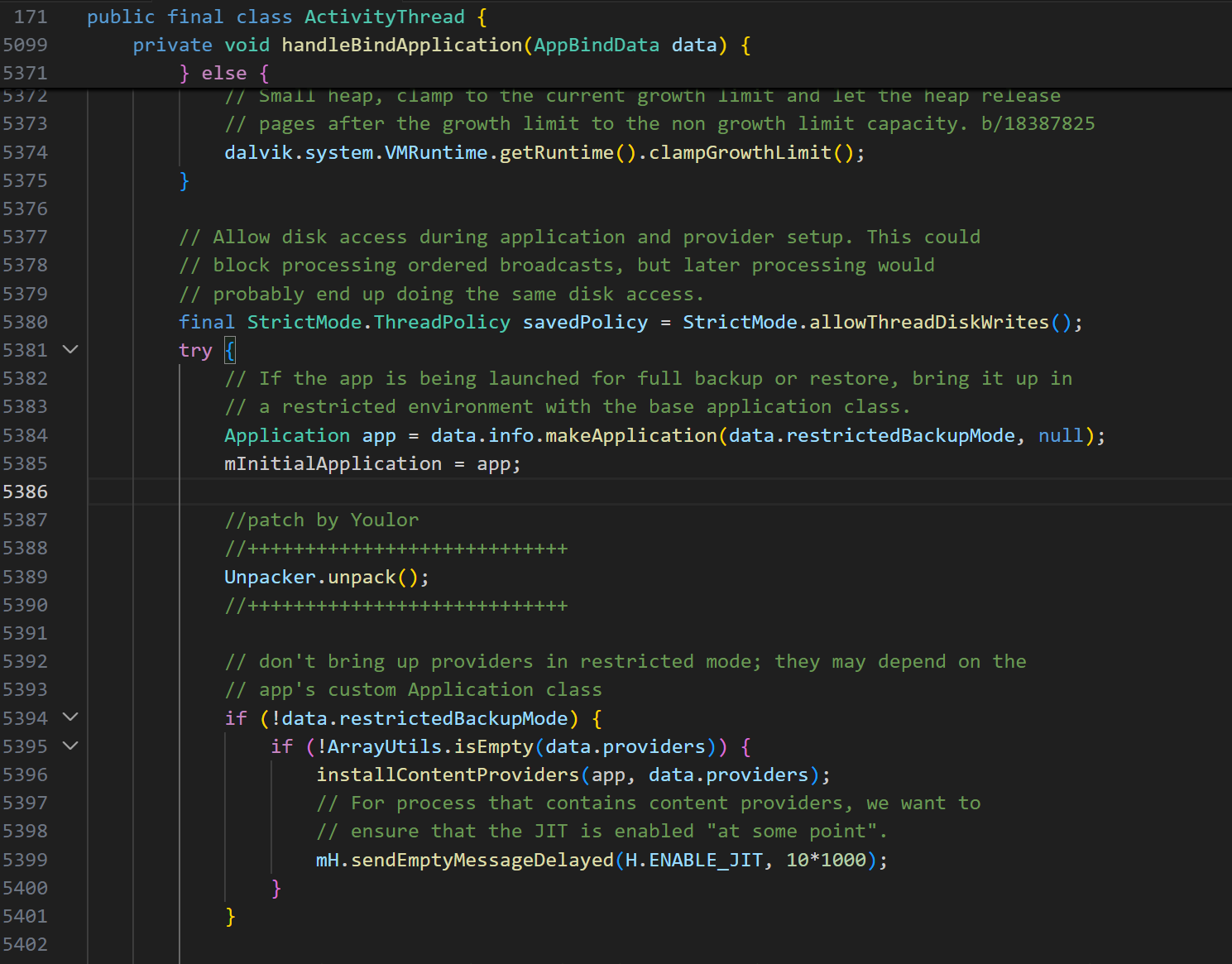
原项目是把这个入口挂载到 ActivityThread 的
handleBindApplication() 中的,插在
mInitialApplication = app
之后,installContentProviders(...)
之前,又最开始的分析可以知道,这个位置是刚初始化 application
实例的时候
native 层分析
native 核心在
android-7.1.2_r33\art\runtime\unpacker\unpacker.cc,分析一下里面的关键逻辑
获取 dump 目录
1 2 3 4 5 6 7 8 9 10 11 12 13 14 15 16 17 18 19 20 21 22 23 24 #define UNPACKER_WORKSPACE "unpacker" std::string Unpacker::getDumpDir () {const self = Thread::Current ();GetJniEnv ();FindClass ("android/app/ActivityThread" );GetStaticMethodID (cls_ActivityThread, "currentActivityThread" , "()Landroid/app/ActivityThread;" );CallStaticObjectMethod (cls_ActivityThread, mid_currentActivityThread);GetFieldID (cls_ActivityThread, "mInitialApplication" , "Landroid/app/Application;" );GetObjectField (obj_ActivityThread, fid_mInitialApplication);FindClass ("android/content/Context" );GetMethodID (cls_Context, "getApplicationInfo" ,"()Landroid/content/pm/ApplicationInfo;" );CallObjectMethod (obj_mInitialApplication, mid_getApplicationInfo);FindClass ("android/content/pm/ApplicationInfo" );GetFieldID (cls_ApplicationInfo, "dataDir" , "Ljava/lang/String;" );GetObjectField (obj_app_info, fid_dataDir);const char *cstr_dataDir = env->GetStringUTFChars (dataDir, nullptr );std::string dump_dir (cstr_dataDir) ;"/" ;ReleaseStringUTFChars (dataDir, cstr_dataDir);return dump_dir;
先获取 ActivityThread,再从中取出当前进程对应的
Application 对象,再调用 getApplicationInfo()
获取 ApplicationInfo,然后读取其中的 dataDir
字段,也就是应用自己的私有数据目录,之后把这个 java 字符串转换成 c++
字符串,在末尾拼接一个 /unpacker 并把整个完整路径返回
根据后面的代码对应生成的结构目录是
1 2 3 4 <dataDir>/unpackermethod dataDir >/unpacker /unpacker .json
其中 unpacker.json 记录了每个 dex
的信息,在后续主动调用时可能会遇到中断崩溃的情况,有了这个
json,下次线程再触发时,就可以从中断的位置继续而不是从头开始
从 ART 枚举当前进程所有的
dex 文件
1 2 3 4 5 6 7 8 9 10 11 12 13 14 15 16 17 std::list<const DexFile*> Unpacker::getDexFiles () {const DexFile*> dex_files;const self = Thread::Current ();Current ()->GetClassLinker ();ReaderMutexLock mu (self, *class_linker->DexLock()) ;const std::list<ClassLinker::DexCacheData>& dex_caches = class_linker->GetDexCachesData ();for (auto it = dex_caches.begin (); it != dex_caches.end (); ++it) {const DexFile* dex_file = data.dex_file;const std::string& dex_location = dex_file->GetLocation ();if (dex_location.rfind ("/system/" , 0 ) == 0 ) {continue ;push_back (dex_file);return dex_files;
运行时 dex 加载:APK -> ClassLoader -> ART -> DexFile ->
DexCache -> ClassLinker
ClassLoader 把 dex 交给 ART,ART 创建
DexFile 对象,同时创建 DexCache
来缓存解析后的方法字段等信息,由 ClassLinker 统一管理
这里先通过 Runtime::Current()->GetClassLinker() 拿到
ClassLinker 实例,再通过
class_linker->GetDexCachesData() 从 ART 当前已加载的 dex
cache 视图里拿 dex,之后再过滤掉系统 dex
dump 整体 dex
1
2
3
4
5
6
7
8
9
10
11
12
13
14
15
16
17
18
19
20
21
22
23
24
25
26
27
void Unpacker::dumpAllDexes () for (const DexFile* dex_file : Unpacker_dex_files_) {getDexDumpPath (dex_file);if (access (dump_path.c_str (), F_OK) != -1 ) {ULOGI ("%s already dumped, ignored" , dump_path.c_str ());continue ;const uint8_t * begin = dex_file->Begin ();size_t size = dex_file->Size ();int fd = open (dump_path.c_str (), O_RDWR | O_CREAT, 0777 );if (fd == -1 ) {ULOGE ("open %s error: %s" , dump_path.c_str (), strerror (errno));continue ;std::vector<uint8_t > data (size) ;memcpy (data.data (), "dex\n035" , 8 );memcpy (data.data () + 8 , begin + 8 , size - 8 );size_t written_size = write (fd, data.data (), size);if (written_size < size) {ULOGW ("fwrite %s %zu/%zu error: %s" , dump_path.c_str (), written_size, size, strerror (errno));close (fd);ULOGI ("dump dex %s to %s successful!" , dex_file->GetLocation ().c_str (), dump_path.c_str ());
遍历已经收集到的 dex,从 DexFile
里面取出内存起始地址 和大小 ,另外把 dex
文件的前 8 个字节替换成标准 dex 文件的魔数
dex\n035,再拷贝剩余内容并写入到文件中
核心部分 invokeAllMethods()
主动调用所有方法
1
2
3
4
5
6
7
8
9
10
11
12
13
14
15
16
17
18
19
20
21
22
23
24
25
26
27
28
29
30
31
32
33
34
35
36
37
38
39
40
41
42
43
44
45
46
47
48
49
50
51
52
53
54
55
56
57
58
59
60
61
62
63
64
65
66
67
68
69
70
71
72
73
74
75
76
77
78
79
80
81
82
83
84
85
86
87
88
89
90
91
92
93
94
95
96
97
98
99
100
101
102
103
104
105
106
107
108
109
110
111
112
113
114
115
116
117
118
119
120
121
122
123
124
125
126
127
128
129
130
131
132
133
134
135
136
137
138
139
140
141
142
143
144
145
146
147
148
149
150
void Unpacker::invokeAllMethods () const self = Thread::Current ();Current ()->GetClassLinker ();for (const DexFile* dex_file : Unpacker_dex_files_) {uint32_t class_idx = 0 ;bool skip_clinit = false ;nullptr ;nullptr ;nullptr ;cJSON_GetObjectItemCaseSensitive (Unpacker_json_, "dexes" );CHECK (dexes != nullptr );cJSON_ArrayForEach (dex, dexes) {cJSON_GetObjectItemCaseSensitive (dex, "location" );cJSON_GetObjectItemCaseSensitive (dex, "dump_path" );cJSON_GetObjectItemCaseSensitive (dex, "class_size" );char * location_str = cJSON_GetStringValue (location);char * dump_path_str = cJSON_GetStringValue (dump_path);uint32_t class_size_num = cJSON_GetNumberValue (class_size);if (strcmp (location_str, dex_file->GetLocation ().c_str ()) == 0 strcmp (dump_path_str, getDexDumpPath (dex_file).c_str ()) == 0 NumClassDefs ()) {cJSON_GetObjectItemCaseSensitive (dex, "current" );cJSON_GetObjectItemCaseSensitive (dex, "failures" );cJSON_GetObjectItemCaseSensitive (current, "index" );cJSON_GetObjectItemCaseSensitive (current, "descriptor" );cJSON_GetObjectItemCaseSensitive (current, "status" );uint32_t index_num = cJSON_GetNumberValue (index);char * descriptor_str = cJSON_GetStringValue (descriptor);char * status_str = cJSON_GetStringValue (status);CHECK (strcmp (descriptor_str, dex_file->GetClassDescriptor (dex_file->GetClassDef (index_num))) == 0 );if (strcmp (status_str, "Resolved" ) == 0 ) {true ;else if (strcmp (status_str, "Ready" ) == 0 ) {else {1 ;break ;if (dex == nullptr ) {cJSON_CreateObject ();cJSON_AddStringToObject (dex, "location" , dex_file->GetLocation ().c_str ());cJSON_AddStringToObject (dex, "dump_path" , getDexDumpPath (dex_file).c_str ());cJSON_AddNumberToObject (dex, "class_size" , dex_file->NumClassDefs ());cJSON_AddObjectToObject (dex, "current" );cJSON_AddNumberToObject (current, "index" , class_idx);cJSON_AddStringToObject (current, "descriptor" , dex_file->GetClassDescriptor (dex_file->GetClassDef (class_idx)));cJSON_AddStringToObject (current, "status" , "Ready" );cJSON_AddArrayToObject (dex, "failures" );cJSON_AddItemToArray (dexes, dex);CHECK (current != nullptr );FindDexCache (self, *dex_file, false );StackHandleScope<2> hs (self) ;Handle<mirror::ClassLoader> h_class_loader (hs.NewHandle(Unpacker_class_loader_)) ;Handle<mirror::DexCache> h_dex_cache (hs.NewHandle(dex_cache)) ;for (; class_idx < dex_file->NumClassDefs (); class_idx++) {const char * class_descriptor = dex_file->GetClassDescriptor (dex_file->GetClassDef (class_idx));ULOGI ("dumping class %s %u/%u in %s" , class_descriptor, NumClassDefs (), dex_file->GetLocation ().c_str ());cJSON_ReplaceItemInObject (current, "index" , cJSON_CreateNumber (class_idx));cJSON_ReplaceItemInObject (current, "descriptor" , cJSON_CreateString (class_descriptor));cJSON_ReplaceItemInObject (current, "status" , cJSON_CreateString ("Ready" ));writeJson ();ResolveType (*dex_file, dex_file->GetClassDef (class_idx).class_idx_, h_dex_cache, h_class_loader);if (klass == nullptr ) {cJSON_ReplaceItemInObject (current, "status" , cJSON_CreateString ("ResolveClassFailed" ));StringPrintf ("ResolveClass error: %s" , self->GetException ()->Dump ().c_str ());cJSON_CreateObject ();cJSON_AddNumberToObject (failure, "index" , class_idx);cJSON_AddStringToObject (failure, "descriptor" , dex_file->GetClassDescriptor (dex_file->GetClassDef (class_idx)));cJSON_AddStringToObject (failure, "reason" , reason.c_str ());cJSON_AddItemToArray (failures, failure);writeJson ();ClearException ();false ;continue ;cJSON_ReplaceItemInObject (current, "status" , cJSON_CreateString ("Resolved" ));writeJson ();StackHandleScope<1> hs2 (self) ;Handle<mirror::Class> h_class (hs2. NewHandle(klass)) ;if (!skip_clinit) {bool suc = class_linker->EnsureInitialized (self, h_class, true , true );if (!suc) {cJSON_ReplaceItemInObject (current, "status" , cJSON_CreateString ("EnsureInitializedFailed" ));writeJson ();ClearException ();ObjectLock<mirror::Class> lock (self, h_class) ;SetStatus (h_class, mirror::Class::kStatusInitialized, self);else {cJSON_ReplaceItemInObject (current, "status" , cJSON_CreateString ("Inited" ));writeJson ();else {lock (self, h_class);SetStatus (h_class, mirror::Class::kStatusInitialized, self);false ;cJSON_ReplaceItemInObject (current, "status" , cJSON_CreateString ("Inited" ));writeJson ();size_t pointer_size = class_linker->GetImagePointerSize ();auto methods = klass->GetDeclaredMethods (pointer_size);enableFakeInvoke ();for (auto & m : methods) {if (!method->IsProxyMethod () && method->IsInvokable ()) {uint32_t args_size = (uint32_t )ArtMethod::NumArgRegisters (method->GetShorty ());if (!method->IsStatic ()) {1 ;std::vector<uint32_t > args (args_size, 0 ) ;if (!method->IsStatic ()) {AllocObject (self);0 ] = StackReference<mirror::Object>::FromMirrorPtr (thiz).AsVRegValue (); Invoke (self, args.data (), args_size, &result, method->GetShorty ());disableFakeInvoke ();cJSON_ReplaceItemInObject (current, "status" , cJSON_CreateString ("Dumped" ));writeJson ();
在 invokeAllMethods()
进行前有两项前置工作已经准备好了:获取了当前进程的所有业务 dex;拿到了
当前 app 的 class loader
然后进行了两层遍历,外层遍历每个 dex,内层遍历这个 dex
中的每个类,在这个过程中,每个 class 会经历 Ready -> Resolved ->
Inited -> Dumped 这样的流程,如果失败就还有 ResolveClassFailed 和
EnsureInitializedFailed 两个状态;这样设计的目的是每处理一个
class,都把状态写进
json,如果遇到中断了,下次就能接着中断的位置继续处理
Resolved 说明这个类已经 ResolveType()
成功了;Init 说明这个类已经
EnsureInitialized() 成功了;Dumped
说明这个类的方法已经被 fake invoke 过了
总体其实是这个流程
1
2
3
4
5
6
7
8
9
10
11
12
13
Ready invoke all methods
其中的 invoke all methods 是取出类的 declared
method,遍历,过滤掉代理方法和不可调用的方法,之后的
method->Invoke(self, args.data(), args_size, &result, method->GetShorty());
就是真正的 invoke,把当前方法按照 ART 的调用机制执行一遍
fake invoke 的核心作用有两个,一是让非 native
方法强制走解释器,二是让 native 方法不要真的执行
在 unpacker_art.diff 中,改了
ArtMethod::Invoke,加了两个关键分支:
1
2
3
4
5
6
7
8
9
10
11
12
13
14
15
16
17
18
19
20
21
22
23
24
25
26
27
// If the runtime is not yet started or it is required by the debugger, then perform the- if (UNLIKELY(!runtime->IsStarted() || Dbg::IsForcedInterpreterNeededForCalling(self, this))) { + //patch by Youlor + //++++++++++++++++++++++++++++ + //如果是主动调用fake invoke并且不是native方法则强制走解释器 + if (UNLIKELY(!runtime->IsStarted() || Dbg::IsForcedInterpreterNeededForCalling(self, this) + || (Unpacker::isFakeInvoke(self, this) && !this->IsNative()))) { + //++++++++++++++++++++++++++++ @@ -266,6 +276,15 @@ void ArtMethod::Invoke(Thread* self, uint32_t* args, uint32_t args_size, JValue*+ //patch by Youlor + //++++++++++++++++++++++++++++ + //如果是主动调用fake invoke并且是native方法则不执行 + if (Unpacker::isFakeInvoke(self, this) && this->IsNative()) { + // Pop transition. + self->PopManagedStackFragment(fragment); + return; + } + //++++++++++++++++++++++++++++
如果这是 fake invoke,而且方法不是 native,就强制通过
EnterInterpreterFromInvoke() 进解释器
另外如果是 fake invoke,但目标方法是 native,那就直接
return,根本不要执行
总结下来,一个方法从被扫到到被 dump 出来,经历的流程是这样的:
invokeAllMethods() 找到一个方法,执行
method->Invoke()因为当前处于 fake invoke
状态,ArtMethod::Invoke 不走正常编译路径,强制走解释器
解释器开始执行这个方法的 dex 指令
每执行一条指令前,会调用
beforeInstructionExecute(),判断现在是否拿到了真实代码
如果拿到了就 dumpMethod(),直接结束这次解释执行
默认是使用 fake invoke,只在识别到特定的壳时就会切到 real
invoke,因为一般情况下当这个方法第一次被执行到时,运行时已经能拿到真实
CodeItem,或者很快就能拿到,直接 dumpMethod
就行,而部分壳的方法入口不是原始业务代码,而是先跳走,跳到一段壳自己的逻辑,运行完后再跳回原始代码区域,所以就得先让它沿着壳
stub 跑几步,等中间那个关键调用执行完,真实代码才暴露出来
1 2 3 4 5 6 7 8 9 10 11 12 13 14 15 16 17 18 19 20 21 22 23 24 25 26 27 28 29 30 31 32 33 34 35 36 37 38 39 40 41 42 43 44 45 46 47 48 49 50 51 52 53 54 55 56 57 58 59 60 61 62 63 64 65 66 67 bool Unpacker::beforeInstructionExecute (Thread *self, ArtMethod *method, uint32_t dex_pc, int inst_count) if (Unpacker::isFakeInvoke (self, method)) {const uint16_t * const insns = method->GetCodeItem ()->insns_;const Instruction* inst = Instruction::At (insns + dex_pc);uint16_t inst_data = inst->Fetch16 (0 );Opcode (inst_data);if (inst_count == 0 && opcode != Instruction::GOTO && opcode != Instruction::GOTO_16 && opcode != Instruction::GOTO_32) {dumpMethod (method);return true ;else if (inst_count == 0 && opcode >= Instruction::GOTO && opcode <= Instruction::GOTO_32) {return false ;else if (inst_count == 1 && opcode >= Instruction::CONST_4 && opcode <= Instruction::CONST_WIDE_HIGH16) {return false ;else if (inst_count == 2 && (opcode == Instruction::INVOKE_STATIC || opcode == Instruction::INVOKE_STATIC_RANGE)) {disableFakeInvoke ();enableRealInvoke ();return false ;else if (inst_count == 3 ) {if (opcode >= Instruction::GOTO && opcode <= Instruction::GOTO_32) {const Instruction* inst_first = Instruction::At (insns);Opcode (inst->Fetch16 (0 ));CHECK (first_opcode >= Instruction::GOTO && first_opcode <= Instruction::GOTO_32);ULOGD ("found najia/ijiami %s" , PrettyMethod (method).c_str ());switch (first_opcode)case Instruction::GOTO:dumpMethod (method, 2 );break ;case Instruction::GOTO_16:dumpMethod (method, 4 );break ;case Instruction::GOTO_32:dumpMethod (method, 8 );break ;default :break ;else {dumpMethod (method);return true ;dumpMethod (method);return true ;return false ;bool Unpacker::afterInstructionExecute (Thread *self, ArtMethod *method, uint32_t dex_pc, int inst_count) const uint16_t * const insns = method->GetCodeItem ()->insns_;const Instruction* inst = Instruction::At (insns + dex_pc);uint16_t inst_data = inst->Fetch16 (0 );Opcode (inst_data);if (inst_count == 2 && (opcode == Instruction::INVOKE_STATIC || opcode == Instruction::INVOKE_STATIC_RANGE) isRealInvoke (self, method)) {enableFakeInvoke ();disableRealInvoke ();return false ;
dump method
1
2
3
4
5
uint32_t index = method->GetDexMethodIndex ();PrettyMethod (method);const DexFile::CodeItem* code_item = method->GetCodeItem ();uint32_t code_item_size = (uint32_t )Unpacker::getCodeItemSize (method);
unpack()
最终入口 unpack() 只有 4 步:初始化环境,收集整体
dex,主动收集真实方法体,回收状态
1
2
3
4
init ()dumpAllDexes ()invokeAllMethods ()fini ()
修补 dex
之后对于 dump 出来的 dex 进行修复,回填 CodeItem,生成最终的 dex
文件
根据上面的工作,已经获得了整体的 dex
骨架,里面有:string/type/proto/method/class 索引、class defs、method
ids,但很多方法体可能还是不完整的,就需要通过 _codeitem.bin 即来自运行时
dump 的真实方法体,含有 methodIndex、方法签名字符串 、codeItemSize、完整
CodeItem,按 methodIndex 找到 dex 里的那个方法,把它原来的 code section
替换成 dump 出来的真实 CodeItem
参考
unpacker
FART Android
16 source code